'%3e%3ccircle%20id='Ellipse_59'%20data-name='Ellipse%2059'%20cx='3'%20cy='3'%20r='3'%20transform='translate(11%208.786)'%20fill='none'%20stroke='%23f7941d'%20stroke-linecap='round'%20stroke-linejoin='round'%20stroke-width='2'/%3e%3cpath%20id='Path_82'%20data-name='Path%2082'%20d='M14,2A10,10,0,0,0,4,12a8.048,8.048,0,0,0,1.875,5.625L14,27l8.125-9.375A8.048,8.048,0,0,0,24,12,10,10,0,0,0,14,2'%20transform='translate(0%200)'%20fill='none'%20stroke='%23f7941d'%20stroke-linecap='round'%20stroke-linejoin='round'%20stroke-width='2'/%3e%3c/g%3e%3c/svg%3e)



A practical iSeekBlinds guide to charging, cleaning, troubleshooting and looking after motorised roller blinds
Motorised blinds simplify everyday light and privacy control, whether they are operated by remote, through a compatible smart-home system or as part of a useful schedule. They are particularly helpful for large, frequently used or hard-to-reach windows. Like any powered product, however, they perform best when the fabric, motor, controls and charging setup are looked after correctly.
Maintaining an iSeekBlinds motorised roller blind is generally straightforward and does not require a complicated servicing schedule. Keep the fabric clean, make sure the blind rolls freely, recharge it with the correct equipment and keep furniture or other obstructions away from its path. If operation changes, check the battery, alignment and control setup before assuming the motor has failed.
This guide explains how to maintain the current iSeekBlinds motorised roller blind systems, including RollerIQ, Automate Zero Li-ion and compatible retrofit motors.
1. Know Which Motor You Have
The first step in maintaining a motorised blind is knowing which motor is installed.
iSeekBlinds currently offers two main motorised roller blind options:
- •
RollerIQ
- •
Automate Zero Li-ion
Both are rechargeable and chain-free, but their controls, chargers and troubleshooting processes differ.
RollerIQ is designed for compatible smart-home control using Matter over Thread.
Automate Zero Li-ion is controlled using a compatible remote, with optional hub-based smart-control features available through compatible equipment.
The motor type matters because charging, control and troubleshooting are different for each system.
Do not assume all motorised blinds use the same charger or setup process.
2. RollerIQ Maintenance
RollerIQ is the iSeekBlinds smart motor option.
It is designed to work with compatible systems including:
- •
Apple Home
- •
Google Home
- •
Amazon Alexa
- •
Samsung SmartThings
- •
Other compatible Matter environments
RollerIQ uses Matter over Thread. Most day-to-day maintenance is simple. Keep the blind clean. Recharge the motor when needed. Make sure the blind moves freely. Keep the smart-home connection working.
And avoid changing pairing or reset settings unless there is a reason to do so.
If the blind is operating normally, there is usually no need to repeatedly reset or re-pair it.
If the system is operating reliably, leave its pairing and reset settings unchanged.
3. Automate Zero Li-ion Maintenance
Automate Zero Li-ion is the iSeekBlinds remote-controlled motor option.
Depending on blind width, the appropriate Automate motor is selected for the blind.
Automate Zero requires a compatible remote for normal operation.
For ongoing care:
- •
Keep the motor charged.
- •
Keep the remote somewhere easy to find.
- •
Check the remote if the blind suddenly stops responding.
- •
Make sure the blind continues to roll evenly.
- •
Keep the fabric clear of furniture and obstructions.
- •
Follow the correct pairing instructions if a remote needs to be replaced or reconfigured.
One compatible remote can manage multiple blinds, based on the remote and grouping setup.
This makes it worth keeping track of which blinds are assigned to each channel or group.
4. How Often Do Motorised Blinds Need Charging?
Rechargeable motor battery life is generally around 10 to 12 months, although actual results vary with blind size and use.
That does not mean every blind will need charging on exactly the same schedule.
Battery life can vary based on:
- •
Blind size
- •
Motor type
- •
How often the blind moves
- •
How far it travels
- •
How many automated routines are used
- •
Daily household use
A bedroom blind that opens once in the morning and closes once at night may use less power than a living room blind that moves several times throughout the day.
Charging is easier to manage when you respond to actual use rather than following an unnecessary monthly schedule.
Do not worry about charging on a fixed monthly schedule. Pay attention to how the blind behaves.
Recharge the motor when required, before low power begins to affect normal operation.
5. Use the Correct Charger
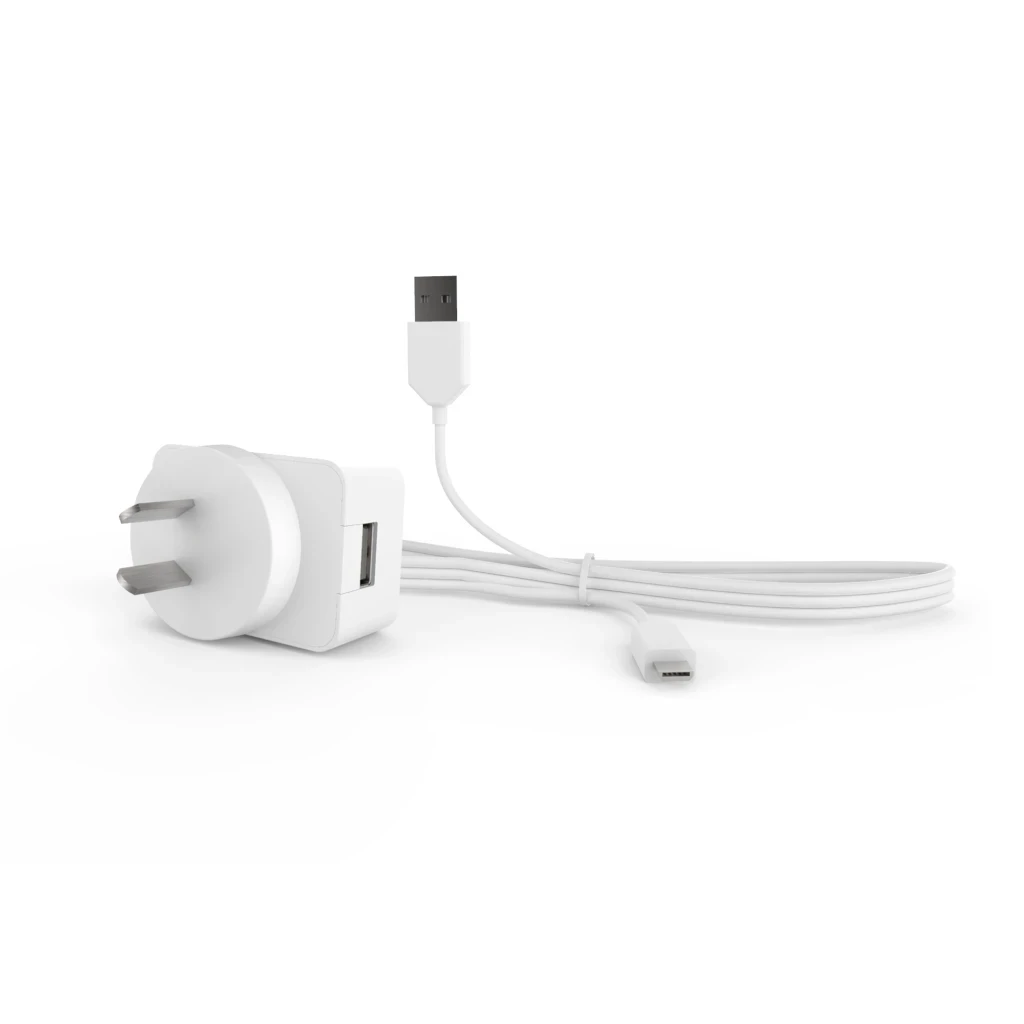
This is one of the most important maintenance points. Not all iSeekBlinds motors use the same charging system. RollerIQ uses USB-C charging. Automate Zero Li-ion uses the appropriate Automate charger and cable. Always use the charging method specified for your motor.
Do not assume that because two motors are rechargeable they use the same charger.
When ordering new motorised blinds, make sure you have the appropriate charger.
One charger can often be shared across multiple compatible blinds in the home, so you generally do not need one charger for each blind.
6. Plan Charging Access Before Installation
Good maintenance starts before the blind is installed. Consider how you will reach the charging point.
This matters particularly for:
- •
Tall windows
- •
Windows above furniture
- •
Large sliding doors
- •
High bedroom windows
- •
Hard-to-reach installations
- •
Blinds positioned behind deep benchtops
A rechargeable motor is convenient only if you can reach it when charging is needed.
For most normal windows, this is straightforward.
For unusually high or difficult windows, charging access should be considered during the measuring and ordering stage.
This is particularly important where furniture may later be placed in front of the window.
7. Do Not Wait for a Maintenance Problem
Motorised blinds usually give signs when something is not operating normally.
Pay attention if you notice:
- •
Slower movement
- •
Uneven rolling
- •
A blind drifting sideways
- •
Unusual stopping
- •
The motor not responding normally
- •
More frequent charging
- •
Remote commands not being recognised
- •
Smart-home commands failing
- •
Fabric rubbing against an obstruction
Do not continue repeatedly operating a blind that is obviously struggling.
Check the simple causes first.
Is the battery charged?
Is something blocking the fabric?
Has the blind started rolling unevenly?
Is the remote working?
Has the smart-home connection changed?
Small issues are easier to correct early.
8. Keep the Blind Path Clear
A motorised blind still needs physical space to move.
Check that nothing is touching or obstructing:
- •
The fabric
- •
Bottom rail
- •
Roller
- •
Window handles
- •
Furniture
- •
Plants
- •
Lamps
- •
Bedheads
- •
Kitchen items
- •
Children's toys
A blind rubbing against furniture can track unevenly. A bottom rail catching on something can interrupt operation.
Window handles can interfere with the fabric if the mounting position or roll direction has not allowed enough clearance.
The motor should move the blind. It should not have to fight the room around it.
9. Check for Uneven Rolling
A roller blind should travel evenly.
If the fabric starts drifting towards one side, deal with it rather than allowing it to continue.
The iSeekBlinds installation guide includes a simple troubleshooting method using a small piece of masking tape on the aluminium tube to correct uneven tracking.
This should be done carefully and according to the troubleshooting instructions.
Uneven rolling can happen because of:
- •
Slight installation alignment
- •
Fabric tracking
- •
Changes in how the blind has settled
- •
An uneven mounting surface
The sooner it is corrected, the less chance there is of the fabric rubbing or creasing.
10. Keep Brackets Level and Secure
Motor maintenance is only one part of maintaining a motorised blind.
The brackets matter too.
The blind needs to remain:
- •
Level
- •
Secure
- •
Properly seated
- •
Correctly aligned
If a bracket becomes loose, the blind may start operating unevenly.
If the blind is removed and reinstalled, make sure the motor or control side is installed correctly and supported during the process.
iSeekBlinds recommends care when installing motorised roller blinds so the motor remains correctly positioned inside the tube.
For larger blinds, having two people is sensible.
11. Clean the Fabric Gently
The motor may be the powered part of the blind, but the fabric is what you see every day.
iSeekBlinds recommends gentle cleaning.
For normal roller blind care:
- •
Use a soft, neutral-coloured damp cloth.
- •
Avoid harsh chemicals.
- •
Avoid abrasive rubbing.
- •
Use a vacuum with a brush attachment where appropriate.
Different fabrics may have their own specific care requirements. Always check the individual fabric information if you are unsure.
Regular light cleaning is better than aggressive cleaning after dirt has built up.
12. Keep Dust Away from the Roller Area
Dust naturally builds up around windows.
Over time it can collect on:
- •
The top of the roller
- •
Pelmets
- •
Brackets
- •
Window ledges
- •
Fabric edges
There is no need to dismantle the motor to clean these areas.
Instead, keep accessible surfaces reasonably clean. A soft cloth or suitable vacuum attachment is usually enough.
Do not spray cleaning chemicals directly into the motor, charging connection or control components.
The maintenance goal is gentle surface cleaning. Do not open or attempt to service the motor internally.
13. RollerIQ Smart-Home Maintenance
RollerIQ adds another maintenance area. Connectivity.
If a RollerIQ blind is physically moving correctly but is not responding through the smart-home system, the issue may not be mechanical.
Check:
- •
Is the smart-home device online?
- •
Is the Thread Border Router operating?
- •
Is the blind still visible in the smart-home system?
- •
Have network or smart-home settings recently changed?
- •
Is the RollerIQ motor charged?
Avoid factory resetting the system as the first troubleshooting step.
A reset removes the existing pairing and means the motor needs to be added again.
Use the iSeekBlinds RollerIQ instructions to work through the correct pairing or reset process if required.
14. When to Re-Pair RollerIQ
Re-pairing may be useful when:
- •
The Matter connection has been removed.
- •
You have changed compatible smart-home infrastructure.
- •
The device is no longer recognised after troubleshooting.
- •
A factory reset has intentionally been completed.
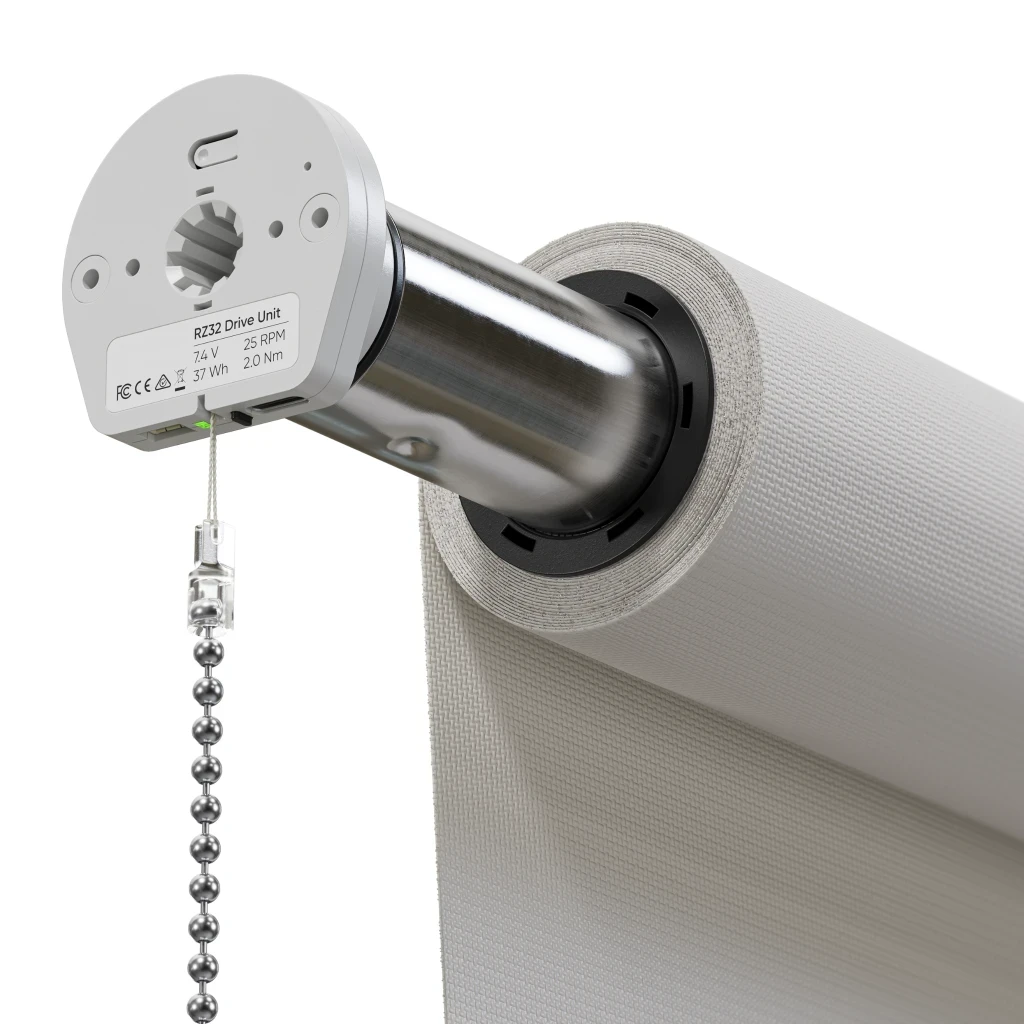
RollerIQ includes a Matter module with a program button and LED indicators for pairing and reset modes.
Follow the iSeekBlinds setup guide rather than experimenting with repeated button presses.
Different LED patterns indicate different modes. Using the correct sequence helps avoid unnecessary resetting.
15. Factory Resetting Should Be a Troubleshooting Step
A factory reset can be useful. But it should not be treated as routine maintenance. If RollerIQ is working properly, leave the pairing alone.
A factory reset is more appropriate when:
- •
You are moving the blind to a new compatible smart-home network.
- •
Pairing has failed and normal troubleshooting has not fixed it.
- •
You intentionally need to remove the existing connection.
After a reset, the Matter module needs to be paired again.
Treat factory resetting as a corrective action. Not something that improves a working blind.
16. Automate Remote Maintenance
If you use Automate Zero, the remote becomes part of the blind system.
Keep the remote:
- •
Somewhere consistent
- •
Away from moisture
- •
Away from unnecessary drops or impacts
- •
Clearly assigned if you have several remotes in the home
If a blind stops responding, check the remote before assuming the motor has failed.
Where multiple blinds are assigned to different channels, also confirm that the correct channel or group is selected.
It is a simple check, but an important one. Confirming the selected channel can prevent unnecessary troubleshooting.
For households with many motorised blinds, keeping control groups logically organised also makes day-to-day operation easier.
17. Maintain Useful Groups and Schedules
Motorised blind systems often become more convenient when blinds are grouped logically.
For instance:
- •
Main bedroom
- •
Living room
- •
East-facing windows
- •
West-facing windows
- •
Upstairs bedrooms
Keep the groups meaningful. The same applies to schedules.
Avoid creating unnecessary automation that moves blinds repeatedly without a practical reason.
Useful schedules might include:
- •
Morning opening
- •
Evening privacy
- •
Afternoon sun control
- •
Bedtime
- •
Movie mode
Simple automation is easier to understand and maintain.
It also makes troubleshooting easier because you know why the blind should be moving.
18. Check Schedules If a Blind Moves Unexpectedly
If a motorised blind starts moving at an unexpected time, do not immediately assume there is a motor problem.
Check automation first.
The blind may be responding to:
- •
A scheduled routine
- •
A smart-home scene
- •
A grouped command
- •
A timer
- •
Another household user's command
This is especially relevant with smart-home systems.
A technically correct automation can still feel like a fault if someone has forgotten it exists.
Before resetting anything, check the control system.
19. Keep Motorised Blinds Properly Programmed
Motorised blinds rely on programmed positions or limits so the system knows where to stop.
If a blind no longer stops where expected, the limits may need attention.
Do not repeatedly run the blind beyond its normal intended positions.
Use the correct iSeekBlinds setup instructions for the motor involved.
This is particularly important after:
- •
Motor replacement
- •
Retrofit installation
- •
Resetting a motor
- •
Re-pairing controls
- •
Changing system setup
Once the limits are correct, normal operation should be straightforward.
20. Retrofit Motor Maintenance
iSeekBlinds Retrofit Motorisation allows compatible existing roller blinds to be upgraded from chain control to rechargeable motor operation.
The maintenance principles are similar to a newly ordered motorised blind.
Keep the motor charged. Keep the fabric clean. Make sure the blind rolls evenly. Keep the operating path clear. Maintain the remote or smart connection. The additional consideration is the existing blind itself.
A retrofit motor can be new while the fabric, tube and brackets are older.
That means it is worth checking the complete blind.
21. Check the Existing Blind Before Retrofitting
Before installing a retrofit motor, make sure the existing blind is worth keeping.
Check:
- •
Fabric condition
- •
Tube compatibility
- •
Brackets
- •
Bottom rail
- •
Blind alignment
- •
Overall operation
The current iSeekBlinds retrofit system requires a compatible roller blind tube.
If you are unsure, use the available compatibility test option before ordering.
Motorising an existing blind makes sense when the existing blind itself is still in good condition.
A motor upgrade cannot fix badly damaged fabric or an unsuitable blind.
22. After Retrofit Installation
Once a compatible blind has been retrofitted:
- •
Reinstall it carefully.
- •
Make sure it remains level.
- •
Program the remote where required.
- •
Set up RollerIQ where selected.
- •
Test the full movement.
- •
Confirm the blind stops correctly.
- •
Check that charging access remains practical.
Do this before considering the job finished. A retrofit should feel like an integrated motorised blind.
Not simply an old blind with a motor pushed into the tube.
23. Double Motorised Roller Blinds Need Two-System Thinking
Double Roller Blinds can include motorisation on one or both layers.
In practice, this means there may be more than one motor at the window.
Keep track of:
- •
Which motor controls which fabric
- •
Which remote channel is assigned
- •
Which charger is required
- •
Which smart-home name belongs to each blind
- •
Which schedules control each layer
Naming matters.
For instance:
Living Room Sunscreen
Living Room Blockout
is much clearer than:
Blind 1 Blind 2
Good organisation becomes part of maintenance when there are multiple motors.
24. Motorised Linked Blinds
Linked Roller Blinds can also use motorised control for suitable configurations.
With wider openings, pay particular attention to:
- •
Individual blind tracking
- •
Alignment
- •
Group programming
- •
Charging access
- •
Independent operation
One blind may develop an issue while the others continue operating normally.
Do not assume the entire linked setup has failed. Identify the specific blind first. Then troubleshoot its motor, battery, alignment and control individually.
25. Battery Performance Can Change with Use
The 10–12 month battery-life figure is an approximate guide. Your actual result may differ.
A motor moving a larger blind several times each day may need charging sooner than a smaller bedroom blind.
That is not automatically a sign of a fault.
Compare performance with:
- •
The blind's size
- •
Frequency of movement
- •
Use of automation
- •
Number of full up-and-down cycles
What matters more is a significant unexpected change.
If a motor suddenly needs charging much more frequently than it previously did under similar use, it may be worth checking the system.
26. Create a Simple Charging Routine
You do not need a complex maintenance calendar. But a simple household charging routine may help.
For instance:
- •
Keep the charger in a known location.
- •
Charge blinds when required rather than repeatedly operating them at low power.
- •
Work room by room if several blinds need charging.
- •
Keep the correct charger clearly identified.
- •
Do not mix up RollerIQ and Automate charging equipment.
One compatible charger can often be shared across multiple blinds.
Keeping it somewhere easy to find prevents a simple maintenance task from becoming frustrating.
27. Cleaning Motorised Blinds in Kitchens
Motorised blinds can be particularly useful in kitchens because windows may be hard to reach behind benches or sinks.
Kitchen environments can also expose blinds to:
- •
Dust
- •
Cooking residue
- •
Occasional splashes
Clean gently and regularly. Do not allow heavy residue to build up. Follow the fabric-specific cleaning instructions. Avoid wetting the motor or electrical connection.
For windows exposed to frequent moisture, make sure the selected window furnishing is appropriate for the location.
Motorisation changes how the blind operates. It does not make ordinary roller blind fabric waterproof.
28. Cleaning Motorised Blinds in Bedrooms
Bedroom motorised blinds usually need less intensive cleaning. Regular dust removal is generally enough.
Pay attention to:
- •
Fabric edges
- •
Bottom rail
- •
Window ledge
- •
Pelmet if fitted
- •
Dust around the top of the blind
Keep bedding, cushions and furniture away from the blind's movement path.
This is particularly important where the blind runs behind a bedhead or bedside furniture.
The motor should always have a clear path.
29. Cleaning Motorised Blinds in Living Rooms
Living room blinds may be larger and exposed to more everyday use.
Check them occasionally for:
- •
Uneven rolling
- •
Furniture contact
- •
Dust
- •
Marks
- •
Charging access
- •
Smart-home operation
Large windows are often where motorisation provides the most convenience. They are also where smooth tracking is particularly important.
A small alignment problem becomes more noticeable across a larger blind.
Address tracking or alignment changes early rather than repeatedly operating a blind that is struggling.
30. When to Use iSeekBlinds Troubleshooting Resources
Not every problem needs technical support immediately. iSeekBlinds provides troubleshooting videos and instructions for common issues.
Use them when:
- •
A blind is rolling unevenly.
- •
Installation needs adjustment.
- •
A motor needs pairing.
- •
RollerIQ needs setup help.
- •
Motor limits need attention.
- •
You need help installing the blind.
- •
A retrofit system needs programming.
The Roller Blind Installation Guide is a useful starting point because it combines installation, RollerIQ setup and common troubleshooting guidance.
Follow the documented process before making unnecessary changes.
31. When to Contact Support
Some situations are better handled with support.
Contact iSeekBlinds when:
- •
The motor is not responding after correct charging and troubleshooting.
- •
A programming problem cannot be resolved using the instructions.
- •
You are unsure whether a component is operating correctly.
- •
Retrofit compatibility is unclear.
- •
The motor or accessory appears damaged.
- •
The issue may relate to warranty.
Provide useful information when asking for help. Motor type. Blind width. Control type. What the blind is doing. What troubleshooting you have already tried. Clear information makes diagnosis easier.
32. Warranty and Long-Term Care
The current iSeekBlinds motorised range lists a 5-year warranty for RollerIQ and Automate Zero motors.
Warranty does not replace basic care.
Long-term performance still is determined by:
- •
Correct installation
- •
Appropriate sizing
- •
Normal operation
- •
Keeping the blind clear
- •
Using the correct charging equipment
- •
Reasonable cleaning
- •
Correct setup
For a broader look at longevity, read How Long Do Motorised Blinds Last?.
Maintenance is mainly about protecting the system you already have.
33. Common Maintenance Mistakes to Avoid
Using the Wrong Charger
RollerIQ and Automate Zero do not use the same charging system.
Always use the correct charger.
Resetting a Smart Blind Too Quickly
A RollerIQ connection problem does not always require a factory reset.
Check the network and pairing status first.
Ignoring Uneven Rolling
A blind drifting sideways should be corrected before the fabric starts rubbing.
Allowing Furniture to Touch the Blind
Keep the operating path clear.
Using Harsh Chemicals
Clean roller blind fabric gently. Do not scrub aggressively.
Forgetting Which Remote Channel Controls Which Blind
Organise channels and groups logically.
Creating Too Many Schedules
Automation should make the home easier. Keep routines useful and understandable.
Assuming Every Problem Is the Motor
A low battery, remote setting, smart-home connection, obstruction or uneven roll may be the real cause.
Ignoring the low-battery signal
The motor will beep when the battery is running low. Recharge it promptly rather than continuing to operate the blind until the battery is completely flat, as a deeply discharged battery may not recharge normally.
Quick Motorised Blind Maintenance Checklist
Every so often, check:
- •
Is the blind moving smoothly?
- •
Is the fabric tracking evenly?
- •
Is anything touching the blind?
- •
Does the motor need charging?
- •
Am I using the correct charger?
- •
Is charging access still clear?
- •
Is the remote working correctly?
- •
Are remote groups still organised?
- •
Is RollerIQ still connected properly?
- •
Are smart schedules still useful?
- •
Is the fabric clean?
- •
Are the brackets secure?
- •
Does the blind stop at the correct positions?
- •
Are linked or double blinds individually operating correctly?
- •
Do I need to use the iSeekBlinds troubleshooting guide?
You do not need to inspect all of this every week.
The checklist is simply a useful way to diagnose changes when they occur.
Final Thoughts
Maintaining motorised blinds does not need to be complicated.
The current iSeekBlinds motorised roller blind range is built around rechargeable, DIY-friendly systems.
RollerIQ provides Matter over Thread smart-home control. Automate Zero Li-ion provides remote-controlled operation. Both need the same basic approach. Keep the blind clean. Keep the path clear. Make sure it rolls evenly. Recharge it when needed. Use the correct charger.
Maintain the remote or smart-home connection. Follow the setup guide when programming changes are required.
And deal with unusual behaviour early rather than repeatedly forcing the system to operate.
Retrofit motorised blinds need the same care, with the added consideration that the existing blind, tube and brackets may already have years of use.
Double and linked motorised blinds benefit from clear naming, grouping and individual troubleshooting.
The best maintenance routine is not a complicated servicing schedule. It is simply paying attention to the blind.
If it moves smoothly, charges normally, responds correctly and stays clean, there is usually very little else you need to do.
For the broader product overview, read the Complete Guide to Motorised Blinds.
For battery and power differences, see Battery vs Hardwired Motorised Blinds.
And for long-term performance, see How Long Do Motorised Blinds Last?.
Look after the system properly and your motorised blinds can continue providing clean, convenient window control for years.
FAQs
'%3e%3cline%20id='Line_28'%20data-name='Line%2028'%20y2='200'%20transform='translate(1580.5%205493.46)'%20fill='none'%20stroke='%23f7941d'%20stroke-width='5'/%3e%3cg%20id='Ellipse_50'%20data-name='Ellipse%2050'%20transform='translate(1559%205665.46)'%20fill='%23171717'%20stroke='%23f7941d'%20stroke-width='5'%3e%3ccircle%20cx='21.5'%20cy='21.5'%20r='21.5'%20stroke='none'/%3e%3ccircle%20cx='21.5'%20cy='21.5'%20r='19'%20fill='none'/%3e%3c/g%3e%3c/g%3e%3c/svg%3e)